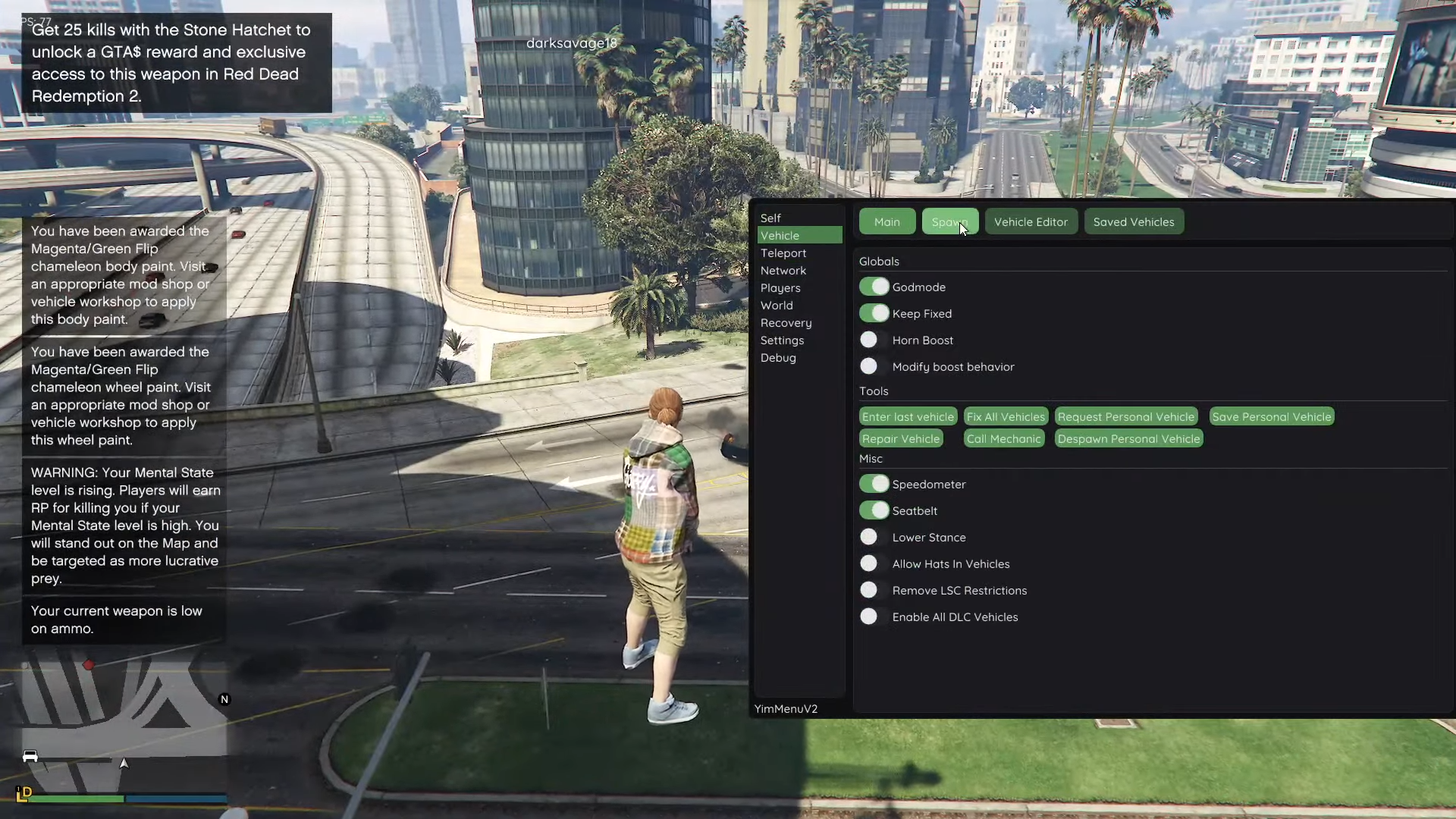
GTA V Enhanced & Legacy · Mod Directory 2026

YimMenu and the GTA V Modding Ecosystem

Compare features, compatibility, Lua support, and safety for the biggest mod menus, injectors, and utilities. Always verify version history before downloading. Educational and informational use only.

30+ Tools Indexed Utilities
15+ Injectors DLL & Memory Loaders
4 Mod Menus Enhanced & Legacy
Free Downloads Open Community Access
System

Anti-Cheat Utilities

Configuration Guide

Disable BattlEye

Run single-player or story mod configurations without BattlEye interference across Steam, Epic Games, and Rockstar Launcher.

Read guide →
Utility

FSL (Local Save Manager)

Local profile and progress tool for GTA V Legacy & Enhanced — supports local session testing and isolated data experiments.

Explore FSL →
Directory

Injectors & Core Loaders

Standard DLL loaders, injectors, and compatibility dependencies required for running custom mods on PC.

View all tools →
Extensions

Lua Scripts & Modules

Browse all scripts →
Yim v1 / Legacy

YimMenu Lua Repository

Protection extensions, automated heist planners, and helper modules written for YimMenu's original Lua environment.

Yim v2 / Enhanced

YimMenu V2 Lua Modules

Compatibility scripts for the Enhanced edition, including career-progress unlocks and next-gen vehicle tuning utilities.

Multi-Menu

Kiddions & Stand-alone Luas

External script presets, stat checkers, and utility macros designed for Kiddions and other popular external loaders.

Explore library →
Utilities

Gaming Tools & Injectors

Essential manual-mapping DLL injectors, memory debuggers, and shader utilities used alongside YimMenuV2.

DLL Injectors & Memory Tools

Active

Process Hacker

Advanced system monitoring tool with injection capabilities and memory editing features.

Download
Active

Cheat Engine

Comprehensive memory scanner and debugger with injection, table creation, and scripting support.

Download

Game Modifications & Utilities

Active

ReShade

Post-processing injection tool for enhancing graphics in any game with shaders and effects.

Download
Active

Xenos Injector

Standard manual-mapping DLL injector used to load YimMenu and other menu DLLs into GTA5.exe.

Download
Safety First

Safety & Usage Guidelines

Secondary Accounts

Never risk main accounts with high game progression. Always test tools using throwaway or secondary accounts.

Verify File Hashes

Antivirus programs flag memory injectors as heuristic false positives. Always cross-reference SHA256 hashes on VirusTotal before running.

Low Profile Gameplay

Excessive griefing, teleporting, or adding unrealistic amounts of in-game currency drastically increases server-side flag triggers.

Check Game Versions

Every GTA V patch changes memory addresses. Never launch outdated DLLs after a patch has rolled out.

This catalog is for educational and informational purposes only. Third-party modding may violate Rockstar Games Terms of Service and End User License Agreements. Use all software at your own discretion. We do not host, distribute, or endorse any mod files directly.

Help & FAQ

Common Questions

How do I open the YimMenu overlay in-game?

Once injected into GTA5.exe, press INSERT or Ctrl+\ on your keyboard to toggle the ImGui overlay on or off.

What do I need to install before using YimMenu?

You need GTA V Enhanced (or Legacy), BattlEye disabled via launcher settings or the -nobattleye launch argument, a manual-mapping DLL injector such as Xenos Injector, and optionally FSL (WINMM.dll or version.dll) placed in the game root directory.

Why do I keep getting kicked from public sessions?

There is no public BattlEye bypass for GTA V Enhanced. Joining public sessions without BattlEye active causes a heartbeat check failure within 30–90 seconds, resulting in an automatic kick. Use solo or invite-only private sessions instead.

Is this safe? Can I get banned?

Yes, account suspension risk always exists. Using any third-party modification violates Rockstar Games Terms of Service. While FSL redirects saves locally to %APPDATA%/FSL to reduce cloud save corruption, it does not prevent server-side account flags.

I removed FSL and my progress disappeared.

FSL stores modded progression locally inside %APPDATA%/FSL rather than syncing to Rockstar Cloud servers. When you remove WINMM.dll, the game reverts to your unmodded cloud profile. Restore WINMM.dll to access your local FSL save again.

After removing FSL the game won't start.

This is a known profile cache issue. Navigate to Documents/GTAV Enhanced/Profiles, delete the local profile folder, and relaunch the game so Rockstar Launcher can resynchronize clean profile data.

Where do I download the latest YimMenu build?

Obtain the latest nightly build from the official YimMenu Enhanced or Legacy release page and always verify the SHA256 checksum before injecting.

Why does my antivirus flag the DLL?

DLL injectors and memory-hooking libraries trigger heuristic false positives in Windows Defender and third-party antivirus suites because they attach to running processes. Always inspect the file hash on VirusTotal to confirm file integrity.

Is this site affiliated with Rockstar or Take-Two?

No. YimMods is an independent, community-maintained informational directory and is not affiliated with, endorsed by, or connected to Rockstar Games or Take-Two Interactive.

How do I report a broken tool or dead link?

Visit the Community or Help & Support section to report outdated memory offsets after a GTA V title update or broken archive mirrors.

No questions match your search.